
Best Molecular Visualization Software (And When to Hire an Illustrator Instead)
Molecular visualization is essential for research papers, presentations, MoA diagrams, and journal covers.
But researchers often struggle to choose the right software for creating clean, accurate, visually compelling molecular figures.
There are many tools available — PyMOL, ChimeraX, VMD, UCSF Chimera, Blender, BioRender, and more — and each excels at different tasks.
This guide breaks down the best software for molecular visualization, their strengths, their limitations, and when you should consider hiring a professional scientific illustrator instead.
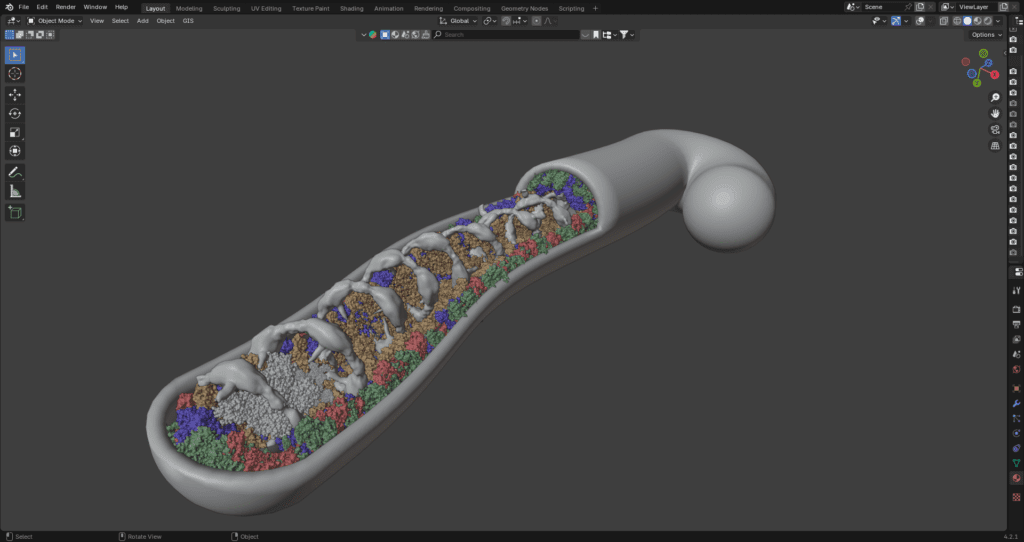
1. PyMOL
✔ Best for:
- publication-quality molecular images
- quick PDB manipulation
- highlighting ligands, active sites
- cartoon/ribbon views
- surface visualization
PyMOL is still the gold standard for molecular rendering in structural biology.
✔ Strengths:
- fast and stable
- high-quality cartoon and surface rendering
- excellent for highlighting ligands
- strong control through scripting
- widely accepted by reviewers
- easy to export high-resolution images
❌ Limitations:
- user interface is outdated and not intuitive
- lighting options are basic
- limited artistic flexibility
- difficult to produce cinematic visuals
Verdict:
Excellent for technical figures, limited for covers or complex scenes.
2. UCSF ChimeraX
✔ Best for:
- advanced molecular visualization
- dynamic scenes
- modern rendering
- multi-model comparisons
ChimeraX is the modern evolution of UCSF Chimera — with dramatically improved visual quality.
✔ Strengths:
- beautiful default shading
- smooth ambient occlusion
- ray-traced lighting
- high-resolution exports
- better for large structures than PyMOL
- fast GPU-based rendering
❌ Limitations:
- still evolving
- complex interface
- scripting required for advanced tasks
Verdict:
The best choice for researchers who want better visuals than PyMOL without going full 3D-rendering.
3. VMD (Visual Molecular Dynamics)
✔ Best for:
- molecular dynamics simulations
- large systems (e.g., membranes, viruses)
- trajectory visualization
- custom analysis
VMD is highly specialized and extremely powerful.
✔ Strengths:
- handles massive molecular systems
- integrates well with MD engines (GROMACS, NAMD, AMBER)
- great for trajectories and time-lapse visuals
- customizable via TCL/Python
❌ Limitations:
- not ideal for static publication figures
- visually outdated defaults
- steep learning curve
- limited artistic quality
Verdict:
Great for MD analysis, not good for modern publication art.
4. Blender (with molecular add-ons)
✔ Best for:
- high-end 3D scientific visuals
- journal covers
- cinematic scenes
- animations
- stylized or hybrid rendering
Blender is a full 3D modeling and rendering software — not a molecular tool by default — but with add-ons (Atomic Blender, MolecularNodes, PyMOL importers), it's incredibly powerful.
✔ Strengths:
- unlimited creative freedom
- realistic lighting and shading
- depth of field, volumetrics, atmosphere
- transparent surfaces and hybrid styles
- perfect for journal covers
- ideal for MoA animations
- professional-grade photorealism
❌ Limitations:
- steep learning curve
- requires artistic + technical skills
- time-consuming
- easy to misrepresent structures without scientific discipline
Verdict:
The best option for cinematic visuals — but requires expertise.
5. Chimera (Classic)
✔ Best for:
- legacy workflows
- older scripts
- basic visualization tasks
Still used by many labs, but visually outdated compared to ChimeraX.
✔ Strengths:
- stable
- familiar to long-time users
- useful for initial exploration
❌ Limitations:
- outdated rendering quality
- no modern shading or depth
Verdict:
Useful for quick work, but not ideal for publication-quality figures today.
6. BioRender
✔ Best for:
- simple molecular icons
- schematic figures
- MoA diagrams
- poster-ready visuals
BioRender is not for real molecular structures — but it is useful for conceptual illustrations.
✔ Strengths:
- extremely easy to use
- clean icons
- fast composition
- great for internal presentations
❌ Limitations:
- not scientifically accurate for real PDB structures
- cannot represent actual molecular geometry
- not accepted by all journals
- not suitable for structural biology
Verdict:
Good for schematics, not for real molecular rendering.
7. MolecularNodes (Blender add-on)
✔ Best for:
- mixing real structures with artistic 3D scenes
- procedural molecular environments
- stylized molecular visualization
- interactive scenes
A newer tool but extremely powerful for cinematic scientific art.
✔ Strengths:
- integrates real structural biology with Blender
- perfect for covers and animations
- procedural control makes complex scenes easy
- beautiful, modern, artistic visuals
❌ Limitations:
- needs Blender knowledge
- can be slow for huge structures
- accuracy must be manually validated
Verdict:
The best tool for artistic molecular art used in covers.
Which Tool Should You Use? (Quick Guide)
| Goal | Best Tool |
|---|---|
| High-quality manuscript figure | PyMOL or ChimeraX |
| Beautiful molecular rendering | ChimeraX |
| Journal cover | Blender + MolecularNodes |
| MoA animation | Blender |
| MD trajectory visual | VMD |
| Simple schematic | BioRender |
| Complex molecular storytelling | Blender + ChimeraX hybrid |
When You Should Hire a Scientific Illustrator Instead
Even with the best tools, many researchers struggle to create visuals that are:
- scientifically accurate
- aesthetically modern
- publication-ready
- properly lit
- color-balanced
- formatted correctly
- visually cohesive
You should consider hiring a specialist when:
✔ the structure requires interpretation
✔ the figure is for a journal cover
✔ you need cinematic lighting
✔ you want clear storytelling
✔ you need multiple complexity versions
✔ the figure must look modern and clean
✔ you want hybrid 2D/3D visual design
✔ you lack time to learn molecular software
Professional illustrators bring both scientific literacy and artistic expertise — something software alone cannot provide.
How I Help Researchers With Molecular Figures
My workflow includes:
✔ structural cleaning (PDB/AlphaFold)
✔ accurate domain representation
✔ cinematic or clean lighting depending on purpose
✔ modern color logic
✔ transparent surfaces for pockets
✔ vector overlays for labels
✔ export in journal-ready formats (TIFF, PNG, SVG, PDF)
✔ optional 3D enhancements for covers
The result is a figure that is scientifically correct, visually elegant, and publication-ready.
Need Help Creating a Molecular Figure or Cover?
If you want a clean, modern, scientifically accurate molecular graphic — from a simple ribbon diagram to a cinematic 3D cover scene — I can help.